QUOTATION COMPARISON SOFTWARE
Quotation comparison software that explains more than the lowest price.
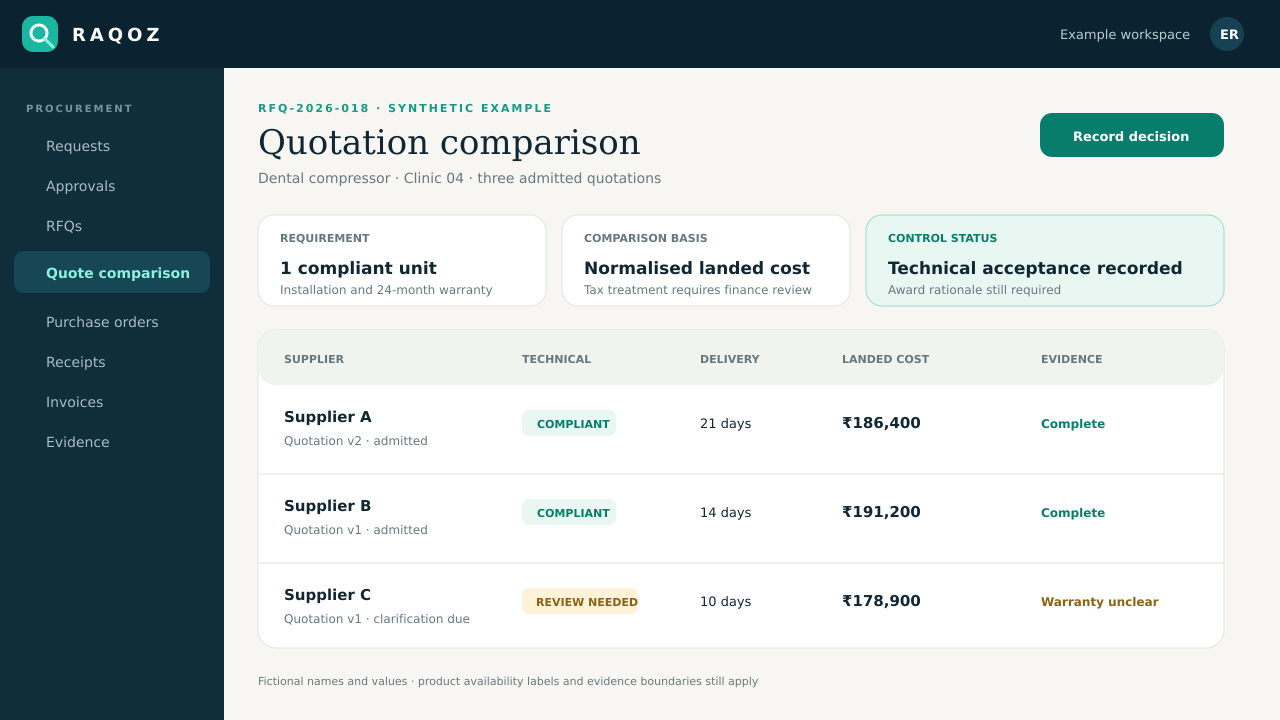
Quotation comparison software places technically accepted supplier offers on a common commercial basis and preserves the evidence behind the award, including a reason when the selected supplier is not L1.
THE OPERATING PROBLEM
Keep context with the decision.
Headline totals hide exclusions, delivery differences, installation, consumables, warranty and tax assumptions. A low number can look like L1 before the offers are genuinely comparable.
WHO IT IS FOR
- Procurement and finance teams comparing supplier offers
- Technical reviewers separating mandatory fit from commercial ranking
- Approvers who need a concise award brief
CONNECTED WORKFLOW
From the request to evidence a reviewer can follow.
Admit
Keep only reviewed quotation evidence in the commercial comparison.
Qualify
Record mandatory technical acceptance separately from price.
Normalise
Compare commercial scope, delivery and declared terms on a common basis.
Award
Record the selected supplier and attributable rationale, including controlled non-L1 selection.
REALISTIC EXAMPLE
One purchase, end to end.
Supplier A is cheapest but excludes installation and cannot meet the required opening date. Supplier B meets the specification, includes installation and costs more. The file shows both the evaluated totals and why B is selected.
What RAQOZ does not replace
RAQOZ supports transparent evaluation; it does not guarantee supplier quality, calculate every tax treatment or replace professional technical judgement.
Start with one bounded scope
- Agree mandatory criteria before opening the commercial comparison.
- Normalise exclusions instead of silently editing supplier quotations.
- Require an evidence-based reason for non-L1 selection and route it to the appropriate authority.
Move from Excel, email and WhatsApp
- Choose one department, location or recurring purchase type; do not migrate every historic spreadsheet on day one.
- Import the supplier and item records that are still active, then assign an owner to duplicates and missing fields.
- Keep old email, WhatsApp and spreadsheet files as source evidence while new purchases begin in the controlled workflow.
- Define who requests, approves, sources, receives and reviews invoices before switching the first live purchase.
Security and evidence boundaries
- Organisation data and procurement records remain tenant-scoped; public-site analytics never receives supplier names, prices, documents or purchase records.
- Material workflow actions retain actor and timestamp evidence, while corrections create new evidence instead of silently rewriting history.
- RAQOZ records procurement decisions and payment states. It does not move money, replace the accounting ledger, certify compliance or issue audit, tax or legal conclusions.
USEFUL NEXT STEPS
Use the workflow before buying it.
BUYER QUESTIONS
Questions worth answering before rollout.
Should the lowest quote always win?
No. The lowest evaluated compliant offer may differ from the lowest headline amount. Delivery, lifecycle cost and mandatory requirements can change the outcome.
Can RAQOZ compare taxes automatically?
The comparison should use finance-reviewed treatment appropriate to the transaction. RAQOZ does not provide tax advice.
How is non-L1 selection controlled?
The selection reason remains explicit and attributable, and organisation policy can require additional approval or evidence.
Are quotation documents public?
No. Supplier quotations and procurement documents remain within the authorised tenant workflow.
ONE PRIMARY ACTION
Prove the workflow with one real purchase.
Start with one department or location. Preserve the old evidence, define the owners and learn before widening the rollout.
Compare one real sourcing event